
Executive Assessment Client Reference
Graduate Management Admission Council (GMAC)
FRONT DESK ADMINISTRATION
ABOUT THE EXECUTIVE ASSESSMENT EXAM
|
The Executive Assessment exam is owned by the Graduate Management Admission Council (GMAC). |
RULES DOCUMENT
|
Pearson Professional Centers Pearson Test Centers |
Professional & Regulatory Candidate Rules Agreement |
|
Pearson VUE Authorized Centers PVTC Selects |
Candidate Rules Agreement |
|
Note: This table lists the rules agreements for each test center type. GMAC might not authorize all of the test center types to deliver its exams. |
|
IDENTIFICATION
|
Note: The number and form of required ID(s) depend on the candidate's country of citizenship, the test center's location, and other factors. For non-standard ID requirements, see "Circumstance-Specific Acceptable Identification." |
|
|
Standard EA Identification Requirements |
Primary required; candidates must present one original (no photocopies), valid (unexpired) form of government-issued ID from the candidate's country of citizenship. The ID must include the candidate's name (in Roman characters*); recent, recognizable photograph; visible signature; and full date of birth.
Note: ID exceptions not covered in this document must be approved before the candidate arrives at the test center and will be noted in a case assigned to your site. This includes documentation that indicates whether a candidate is a refugee or stateless person. * Only applies to candidates testing outside of their country of citizenship. |
|
Primary ID |
Acceptable IDs for Candidates Testing in Country of Citizenship
Note: Candidates must sign the signature pad in the same characters as those that appear on their identification.
Acceptable IDs for Candidates Testing Outside Country of Citizenship
|
|
Exceptions |
|
CIRCUMSTANCE-SPECIFIC ACCEPTABLE IDENTIFICATION
|
Candidate's situation |
Test center location |
ID required |
|
ID is missing a required element (not including signature) |
All countries |
If the ID does not contain the candidate's name in Roman characters, date of birth, or recent photograph, the candidate may supplement the ID with a second form of ID. The second form of ID must also be from the list of IDs allowed for the candidate's country and must contain the missing element. |
|
ID is expired |
All countries |
If the ID is expired, the candidate must present valid renewal papers. Note: Renewal papers do not make expired international travel passports valid, which are never acceptable once expired. |
|
Military personnel or family of military personnel |
Military center |
Candidates must present a military ID. |
|
Any candidate testing in Bangladesh, Ghana, India, Japan, Nepal, Nigeria, Pakistan, Singapore, or South Korea (regardless of country of citizenship) |
Bangladesh, Ghana, India, Japan, Nepal, Nigeria, Pakistan, Singapore, or South Korea |
Candidates (regardless of country of citizenship) must present a passport book. |
|
European Union candidates |
EU Zone |
In addition to the standard EA ID requirements, European Union candidates testing within the EU zone can also provide a valid (unexpired) EU identity card as identification. |
|
Schengen candidates |
Schengen Zone |
Schengen citizens who are testing in the Schengen Zone can provide one of the standard IDs listed under "Acceptable IDs for Candidates Testing in Country of Citizenship." |
|
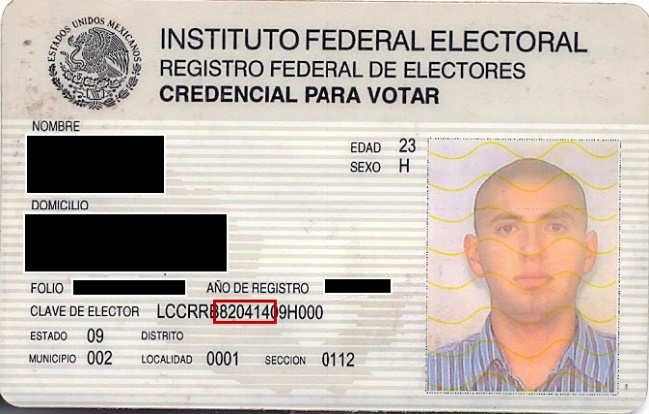
Citizens of Mexico |
Mexico or U.S. |
In addition to the standard EA ID requirements, the following forms of ID are acceptable:
*Mexican voter ID cards are an acceptable form of ID for Mexican citizens testing in Mexico. The date of birth is encoded into the card. It appears in the format of YYMMDD. Below, in the red box, is an example of where the DOB can be found.
|
|
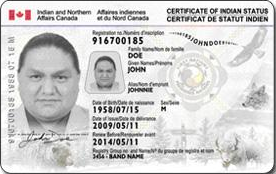
Citizens of Canada |
Canada |
In addition to the standard EA ID requirements, candidates can present a Secure Certificate of Indian Status card (SCIS). Note: The card must be issued after March 2013.
|
|
Non-citizens and non-residents of China, Hong Kong SAR, and Taiwan |
Hong Kong SAR or Taiwan |
Candidates must present a passport book. |
|
Residents of Taiwan |
Taiwan, Macau SAR, Hong Kong SAR |
Candidates must present a passport. |
|
Residents of Taiwan |
Mainland of China |
Candidates must present a Taiwan Compatriot Entry Permit (Tai Bao Zheng). |
|
Chinese citizens of Macau SAR or Hong Kong SAR |
China, including Macau SAR or Hong Kong SAR |
Candidates must present one of the following IDs:
|
|
Residents of the Mainland of China |
Taiwan |
Candidates must present one of the following IDs:
|
|
Chinese citizens |
China, excluding Hong Kong SAR or Macau SAR |
Candidates must present one of the following IDs:
Temporary IDs Temporary versions of the Chinese national ID card are acceptable. If a candidate presents a temporary version of the Chinese national ID card, create a case stating that a temporary version of the Chinese national ID card was presented. When you create the case, select Admissions/Check-in and Problem with candidate ID. Note: A candidate's EA scores are placed on hold until the candidate presents their passport book or official Chinese national ID card to an EA-authorized test center. Inform the candidate that they must present either their passport book or official Chinese national ID card in order to receive their scores. If the candidate does not supply a passport or official Chinese ID within 30 days, they risk having their scores revoked. Additionally, inform the candidate to contact Customer service if they plan to present their passport book or Chinese national ID card at a test center other than the one at which they originally tested. If a candidate comes to your test center to present their passport book or Chinese National ID card, look for the case tied to the candidate. If the candidate did not originally test at your site, the case will be sent to your test center by the Pearson VUE China Quality team. If you cannot locate the case, contact Pearson VUE China Quality team and ask for the case to be sent to your test center. Once you receive the case, update it to indicate that the candidate presented their passport book or official Chinese national ID card. |
|
Citizens of the Palestinian Authority of Jordan |
Jordan or Israel |
Candidates must present both forms of ID:
Note: Palestinians testing in Israel or Jordan should not be turned away if their country of citizenship does not match the country that their passport or other travel documents are issued by. |
|
Tibetan refugees |
Nepal |
Candidates must present one of the following IDs:
|
|
Citizens of India |
India |
Candidates must present a passport book. Please note the following rules for Indian IDs:
Handling Canceled Passports Situation: The candidate has sent their passport in for renewal and the government has sent them back a renewal receipt, acknowledging the passport is in the process of being renewed along with their original passport stamped "CANCELED."
Note: Do not accept magistrate letters, or other documents. |
|
Non-Saudi Arabian citizens working in Saudi Arabia |
Saudi Arabia |
Candidates must present two forms of ID:
|
|
Syrian citizens |
Test centers outside of Syria |
Syrian citizens are permitted to take EA exams. They are not required to present a government-issued document showing that their primary residence is located outside of Syria. Allow them to test if they can meet the standard EA ID requirements listed in the Identification table earlier in this section. |
|
Kosovo citizens |
All countries |
Citizens of Kosovo cannot select Kosovo as their country of citizenship. They must present an international travel passport in order to test. |
|
Non-U.S. citizens who have U.S. naturalization documents (but do not have a passport or permanent resident card) Note: If the candidate has a passport or permanent resident card, refer to the "Acceptable IDs for Candidates Testing Outside Country of Citizenship" list. |
U.S. |
Candidates must present two forms of ID:
Note: Candidates must sign the signature pad in the same characters as those that appear on their identification. |
CHECKING COUNTRY OF CITIZENSHIP AND DATE OF BIRTH
|
Check for Country of Citizenship During admissions, follow these additional instructions to check the candidate's country of citizenship:
Selecting Edit will allow you to view the candidate's demographic information, but you will not be able to change the information.
Note: Always refer to the country listed under the Client Info tab when you are checking the candidate's country of citizenship. The country listed under the Primary tab might not be the candidate's country of citizenship. Note: If you cannot check the candidate's country of citizenship through this process, check the information in Registration Manager.
Check for Dual Citizenship Many candidates have dual citizenship but are able to enter only one country in their profile. If they are required to present a passport, this passport may be from any country, regardless of whether the country matches the "Country of Citizenship" on the profile. In these situations, ask candidates whether they have dual citizenship.
When Country of Citizenship is Incorrect on ID or in Registration System If the ID presented does not match the country of citizenship in the system and the candidate does not have dual citizenship, ask the candidate about the mismatch.
In all these situations, be sure to create a case. When you create the case, select Admissions/Check-in and Problem with candidate ID. Instruct the candidate to contact GMAC to update their demographic information. Do not create a copy of the candidate's ID. If the candidate was allowed to test, their results will be put on hold until their country of citizenship is updated in the system.
Check Date of Birth To further confirm the candidate's identity, follow these steps during admissions to check the candidate's date of birth:
Selecting Edit will allow you to view the candidate's demographic information, but you will not be able to change the information.
Note: If you cannot check the candidate's date of birth through this process, check the information in Registration Manager.
When Date of Birth is Incorrect on ID If the dates do not match and the candidate says that the date of birth is incorrect on the identification, ask the candidate for a second form of approved ID that does contain the correct date of birth.
When Date of Birth is Incorrect in Registration System If the dates do not match and the candidate says that the date of birth is incorrect in the system, ask the candidate for a second form of ID to corroborate the error in the system. Allow the candidate to test (even if the candidate was not able to provide a second ID). You must create a case, selecting Admissions/Check-in and Request to update personal information. Instruct the candidate to contact GMAC to update their demographic information. Do not create a copy of the candidate's ID. The candidate's results will be put on hold until their date of birth is updated in the system.
Israel and Lebanon Passports or Drivers' Licenses If the date of birth on the candidate's ID shows 00/00 for the month and day instead of a standard birth date, have the candidate verbally confirm the actual birth date listed on the candidate's registration and allow them to test without proof of that date on their identification. When people from a country outside Israel apply for an Israeli passport and cannot provide a birth certificate because of the Middle East conflict, the Israel government uses 00/00. The Pearson VUE system does not allow 0's in these fields, so candidates cannot enter the date that appears on their ID when they register for an exam. Note: Dates appear in different formats in different parts of the world. Be aware that the date, month, and year may appear in different orders from country to country. |
NAME-MATCHING GUIDELINES
|
Follow the Executive Assessment Name-Matching Guidelines and note the policies below.
Creating Cases for Name-Matching Discrepancies Name discrepancies must always be documented in a case, even if the candidate is admitted. When filling out the case, be as specific as possible when describing the issue(s).
Passports that Lack Separate Fields for First, Middle, and Last Names Note: The following guidelines apply regardless of where a candidate takes their test. If the order of the names on the passport does not match the order of the names used during registration, follow these steps:
|
DEMOGRAPHIC CHANGES
|
Not permitted; candidates must contact GMAC to update their demographic information. |
ADMISSIONS DATA
|
Digital signature, photograph Note: Collected only at test centers that have the necessary admissions equipment to capture the data. |
ADMISSIONS DATA WAIVERS
|
Candidates cannot waive admissions data. If a candidate refuses to provide admissions data, turn the candidate away. Create a case, selecting Exam delivery, Candidate error or misconduct, and Candidate refused to follow proper procedures. Instruct the candidate to contact the client. |
DOCUMENTS REQUIRED TO TEST
|
None |
LATE ARRIVALS
|
15 minutes; create a case for late candidates who cannot be accommodated. When you create the case, select Admissions/Check-in and Candidate was late. |
PROCTORING
ITEMS ALLOWED IN THE TESTING ROOM
|
Personal Items |
Pearson VUE standard policy |
|
Noteboard/Booklet |
One booklet and pen Note: Test centers not equipped with booklets should supply candidates with two noteboards. |
|
Calculators |
Not permitted; a calculator is built into the Integrated Reasoning section of the exam. |
|
Exhibits |
None |
|
Headphones |
Not applicable |
BREAKS
|
Scheduled |
None |
|
Unscheduled |
Permitted; put the exam in unscheduled break mode. |
|
Leave Building |
Candidates are not permitted to leave the building at any time during an exam. |
|
Access to Personal Belongings |
During unscheduled breaks, candidates may access personal items only if necessary, such as medication and food. |
EXAM EVENTS/RESULTS
|
Candidate Confirmation |
Untimed |
|
Welcome |
Untimed |
|
Non-Disclosure Agreement |
Untimed (click-through) |
|
Tutorial |
12 minutes |
|
Integrated Reasoning |
30 minutes Composed of two sections that each contain six questions. |
|
Verbal |
30 minutes Composed of two sections that each contain seven questions. |
|
Quantitative |
30 minutes Composed of two sections that each contain seven questions. |
|
Results/Exit |
1.5 minutes |
|
Survey |
None |
|
Item Review |
Candidates may mark questions and review them within a section only. Once candidates leave a section, they cannot return to that section later to review and/or make changes. The review time is included in the total amount of time allowed for the exam. Note: Each subsection of the Integrated Reasoning, Verbal, and Quantitative sections contain individual item reviews. |
|
Results |
Official: Yes; candidates receive official results at the test center. Note: Prior to taking the exam, candidates can choose whether to wait to send their scores to their selected schools or to have them sent automatically. |
|
Printout: Yes; candidates receive a score report. |
|
|
Web-based score: No |
CANDIDATE MISCONDUCT
|
Follow the standard policy for candidate misconduct. |
SUPPLEMENTAL INFORMATION
REGISTRATION AND SCHEDULING
Registration Methods |
|
EA candidates can register and schedule by:
Candidates can phone the call center at 888-370-4420 (toll free) and 952-887-6974 (direct inward dial) Monday through Friday, 7:00 AM to 7:00 PM Central Standard Time. Refer to the candidate website for a list of regional phone numbers. Note: Registration and scheduling are not available through test centers. |
Registration Information |
Note: Candidates are blocked from making name or demographic changes 72 hours prior to their exam appointment. If changes must be made during this time, a case is created and sent to the test center at which the candidate is testing. Candidates are told the case number and are instructed to provide it when they arrive at the test center.
|
Rescheduling and Canceling |
|
EA candidates must reschedule and cancel exam appointments at least 24 hours before the appointment through the candidate website or the call center. Appointments must be rescheduled within the authorized exam delivery period. Some registrations with restricted accommodations must be rescheduled or canceled through the call center. |
RETAKE REQUIREMENTS
|
Candidates are allowed to retake the EA exam once. |
ACCOMMODATIONS
|
Candidates must submit requests for accommodations to GMAC, and all requests must be approved before the exam appointment. Pearson VUE cannot approve accommodations.
|
ENDING AN EXAM
|
Follow the standard policy for ending an exam. Note: If a candidate leaves the exam early, follow the standard process for abandoning an exam. |
CONTACTING CLIENT
|
Candidates with questions about an exam or its content should be told to contact GMAC through gmac.com/ea. |